Building an AI Assistant for my SaaS
The problem: powerful tools, paralyzed users
PNXStudios is an AI content-creation platform. Users generate images, voiceovers, music, and video, run multi-camera shoots, and manage all of it in project workspaces. That's the pitch. It's also the problem.
A new user lands on the dashboard and sees a sidebar full of studios, an asset library, settings, and four generation tools, each with its own options. Every feature earned its place. Together they're intimidating. The question we hear from new users isn't "can the platform do X?" It's "where do I start?"
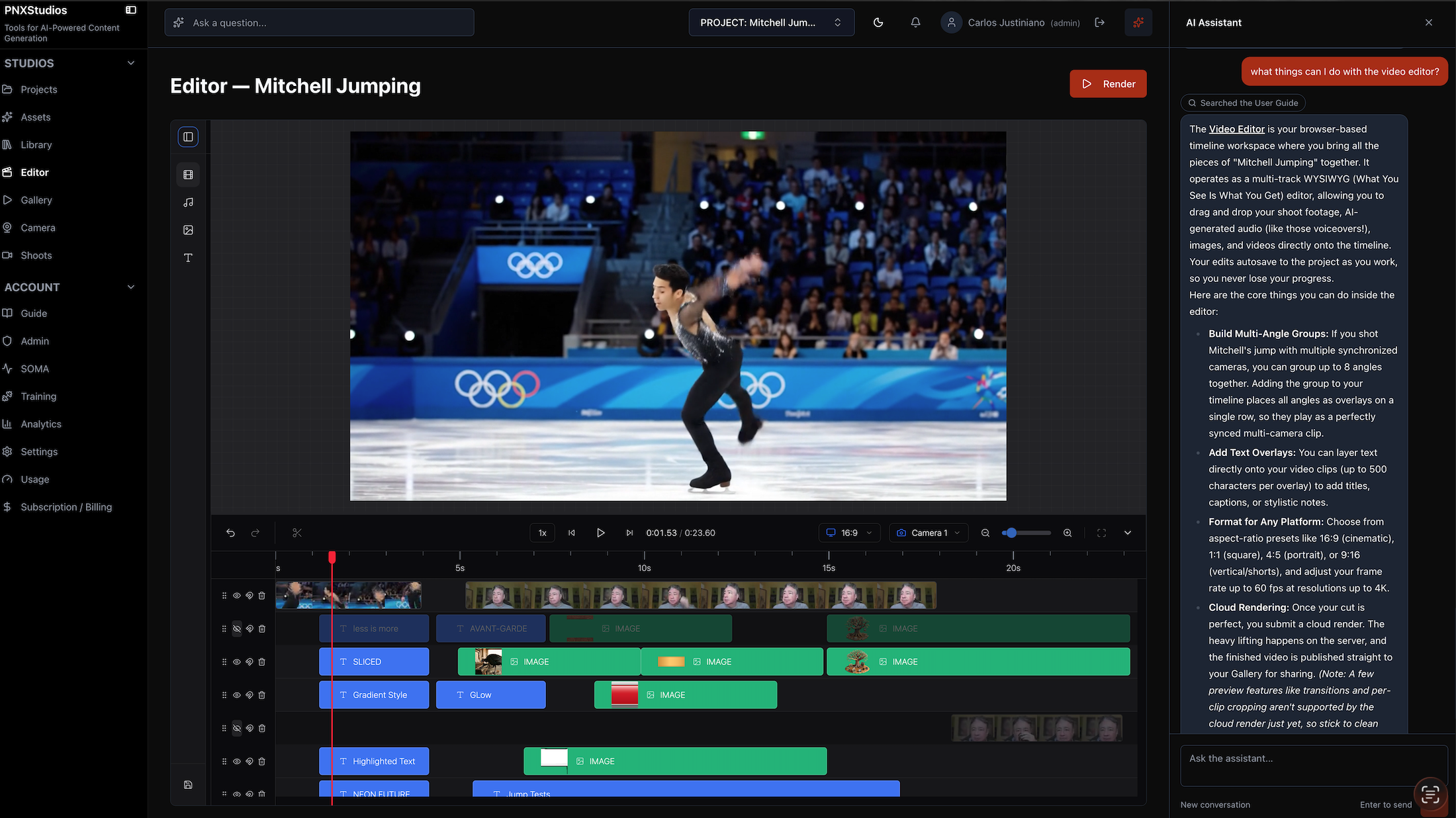
The traditional answer is documentation, so we wrote the user guide. Properly. Here's the uncomfortable math: documenting a content-creation platform honestly produces a mini book. Ours weighs in around 37,000 words, which is novella territory. Nobody reads a novella to make their first thumbnail. Worse, the guide fails at exactly the wrong moment: the user is in the app, stuck, and the answer is forty pages deep in another tab.
So we stopped asking users to go to the guide and built a 24/7 assistant that brings the guide to them. Then, step by step, we taught it to do more than answer questions.
What "effective" means for an in-app assistant
A chat panel is easy. An assistant users trust has to clear a higher bar. We ended up thinking about it as a ladder, where each rung is useful on its own and de-risks the next one. We later noticed the big SaaS players converging on the same ladder, which was reassuring.
Rung 1: It must not make things up
A generic chatbot bolted onto your product will confidently invent workflows you don't have. The fix is retrieval-augmented generation (RAG). We chunked the user guide into 223 sections, embedded them into the Postgres database we already run (pgvector, no new vector-database infrastructure), and gave the assistant a search tool over it. Answers come from the actual guide.
The detail that mattered most: citations users can click. Each retrieved chunk carries a deep link to its exact guide section, so answers cite a clickable link that jumps you to the source. That one feature turned "plausible robot" into "product expert showing its work." Analysis of Intercom's Fin support agent points the same direction: real-world resolution rates run anywhere from about 25% to 80%, and the dominant variable is the quality of the knowledge base, not the model. Your docs are the moat.
Rung 2: It must know where the user is
"How do I generate a voiceover?" deserves a different answer on the Voice Studio page than on the billing page. Each chat turn includes the user's current route plus a short manifest entry describing what that page does. Answers become situated instead of generic, and the assistant can end with a "Take me there" button rather than a paragraph of "click the sidebar, then..."
This rung is cheap. Ours is one static file mapping routes to descriptions. It's also the moment the assistant starts feeling like part of the product instead of a help widget.
Rung 3: It should take you there
Next we let the model navigate. The assistant can move you to the right screen and prefill the form. "Help me make a thumbnail for this project" walks you into the Image Studio with a drafted prompt already in the box. You still click Generate.
The security posture matters here. The model never drives the UI the way a human would; screen-reading "computer use" agents spent 2024 and 2025 stuck between roughly 12% and 60% task success on benchmarks, and the best have only just reached the human baseline of about 72%. That's fine for sites you don't control and unacceptable for your own. Instead the model calls a typed navigate tool, and the browser checks the target against an allowlist before acting, because model output is untrusted input. The assistant can only go where the user could go.
Rung 4: It can do the work, with permission
The top rung we've shipped: the assistant can propose real, credit-spending actions. Ask it for an image and it presents an in-chat confirmation card showing exactly what will run. Nothing executes and nothing is charged until the user clicks Generate. The result renders inline with a save-to-assets button, and every action writes a row to an append-only audit table.
This approval gate isn't timidity. It's where everyone landed. Stripe's assistant creates products where "you only need to confirm." Shopify's Sidekick takes action "with your approval." GitHub's coding agent has full autonomy in a sandbox and zero autonomy at the merge button. Notion logs every agent run and makes changes reversible. The assistant proposes; the human disposes.
There's a fifth rung, multi-step autonomy ("make me a thumbnail" end to end, no clicks), which we've deferred until telemetry from rungs 3 and 4 proves reliability. Climbing too fast is how you end up as a cautionary tale.
Under the hood
For builders who want the parts list, the surprise is how small it is.
Our first chat panel queued each message to a job queue, and the browser polled for the answer every four seconds. It worked, and it felt dead. Polling is also hostile to tool use, since an agentic turn is model, then tool, then model again, often several hops. We moved conversation to a streaming endpoint on an edge function. One wrinkle worth sharing: standard serverless functions on our host cut streams off at ten seconds, while edge functions hold them open. We proved that with a throwaway spike PR that streamed for 36 seconds on real infrastructure before we built the feature. Pricing sealed it: a million streamed chat turns cost about $1.34 in edge invocations versus roughly $250 on Lambda response streaming, which bills for the wall-clock duration of every stream.
For retrieval, pgvector turns the Postgres you already have into your vector store. Chunk by heading, embed, add a hybrid search function (we weight semantic similarity 0.7 and full-text 0.3). Our whole RAG layer added zero new services and zero new dependencies.
For the agent loop, we use the Vercel AI SDK, the open-source ai package. It's framework code, no Vercel hosting required, and it handles the streaming protocol, the useChat state machine in React, and the typed tool-call lifecycle. It has become the default for this stack, with over 20 million monthly downloads by late 2025. We pair it with OpenRouter so model choice stays a config value.
The decision I'd defend hardest is about permissions. Tools that act on the app execute in the browser, riding the user's own session, so the assistant structurally cannot do anything the user couldn't do themselves. There is no privilege-escalation path, and row-level security still applies. We also didn't rewrite media generation. The assistant calls the same API the manual studio buttons call. The new code is a thin conversational layer; the proven machinery underneath is untouched.
On tool count: Shopify's engineering retro on Sidekick reports quality degrading past roughly 20 overlapping tools (they call it "death by a thousand instructions") and recommends a simple single-agent loop over multi-agent architectures. We shipped with six tools and a per-page manifest. It's enough.
Last piece: metering. Assistant chat turns cost us about $0.02. An assistant-initiated image job, about $0.19. Both show up on the user's usage page through the same metering as manual generations. Cost transparency turns out to be a trust feature too.
The cautionary tale worth keeping on your wall
Klarna's AI assistant famously handled two thirds of support chats in its first month, the work of about 700 agents, with resolution times dropping from 11 minutes to under two. About fifteen months later the company was publicly re-hiring humans, the CEO admitting that "cost unfortunately seems to have been a too predominant evaluation factor… what you end up having is lower quality." The AI still handles the volume; humans handle the hard cases. Automate the routine, keep humans reachable, and don't make cost your only eval metric.
One lesson from our own build surprised me: letting an AI press your buttons is an integration test of your buttons. Live-testing the navigation tool exposed a two-month-old rendering bug that had been quietly degrading navigation on any page with a dropdown menu, masked by a fallback that hard-reloaded the page. An agent needed navigation to actually work, so we finally found it.
If you're building one
Climb the ladder, don't leap. Chat, then grounded answers, then navigation, then confirmed actions. Each rung ships value on its own.
Invest in your docs before your prompts. Knowledge-base quality determines assistant quality more than model choice does.
Cite everything. Clickable sources are the difference between a toy and a tool people trust.
Gate every write behind the user, with a confirmation step and an audit log. The assistant proposes; the human disposes.
Spike the scary thing first. One disposable PR answered "will streaming even work on our host?" and turned the real build into a one-day exercise.
Start with one good model. Routing, caching layers, and gateways can wait until your spend justifies them.
If you're a solo builder, rung 1 is an open-source SDK, a Postgres extension, and an edge function. A weekend of work. And if your product is rich enough to need a mini book of a user guide, this might be the most valuable feature you ship this year. The guide stops being a destination. It becomes a colleague.